![[personal profile]](https://www.dreamwidth.org/img/silk/identity/user.png)
![[identity profile]](https://www.dreamwidth.org/img/silk/identity/openid.png)
Because I love my old Photoshop CS, I made it into a layout. For everyone who also loves Photoshop. Or just likes having a confusing layout that has buttons you can't click.
| Photoshop CS | |
| preview | 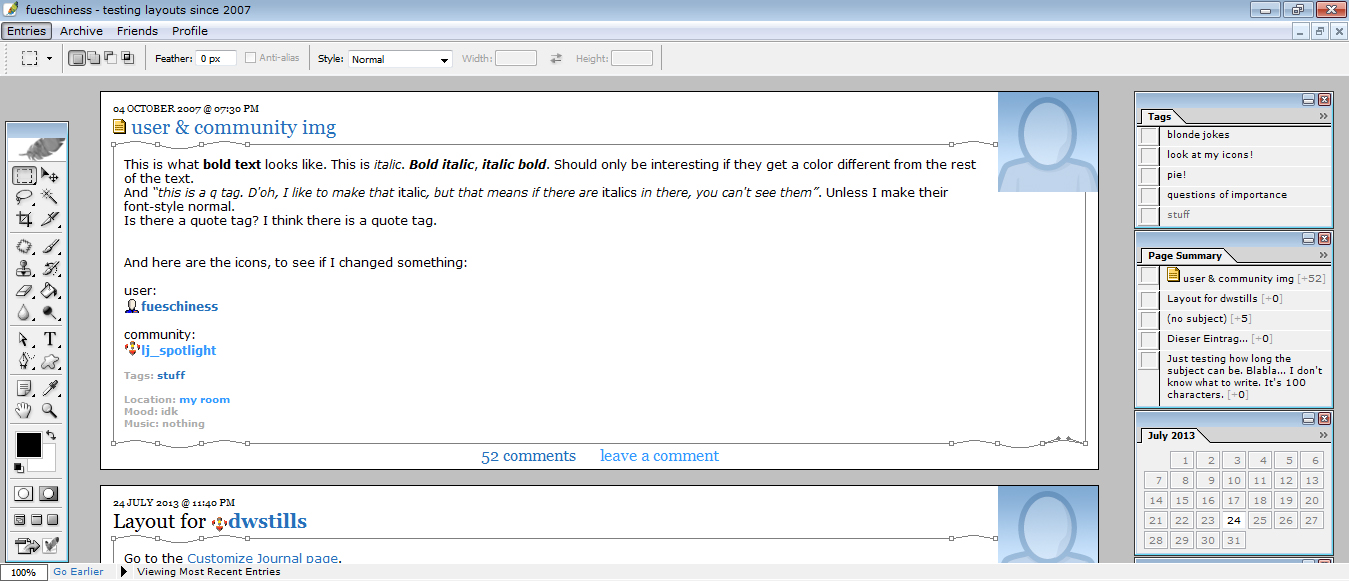 Click here for live preview, then click on the layout's icon. |
| layout info | Based on Flexible Squares. Works for all account types. Tested in Firefox 26, Google Chrome 32 and Internet Explorer 10. The sidebar width isn't changeable, but you can change the width of the maincontent. |
| how to implement this layout | Go to the Customize Journal page. Make sure Style System is S2. Choose the Flexible Squares layout. Go to Custom CSS » Use layout's stylesheet(s): No » Use layout's stylesheet(s) when including custom external stylesheet: No » Use external stylesheets: No insert custom stylesheet |
| Profile Layout | ||||
| You can put links here or more text, if you want. | ||||
| ||||
1 comment | Leave a comment